Your data stays with you
Questions, files and chats never leave your computer. No account, no subscription.
Install Atlas, download a model once, then use it without internet. What you type and the files you add aren't sent anywhere. It's free and you don't need an account.
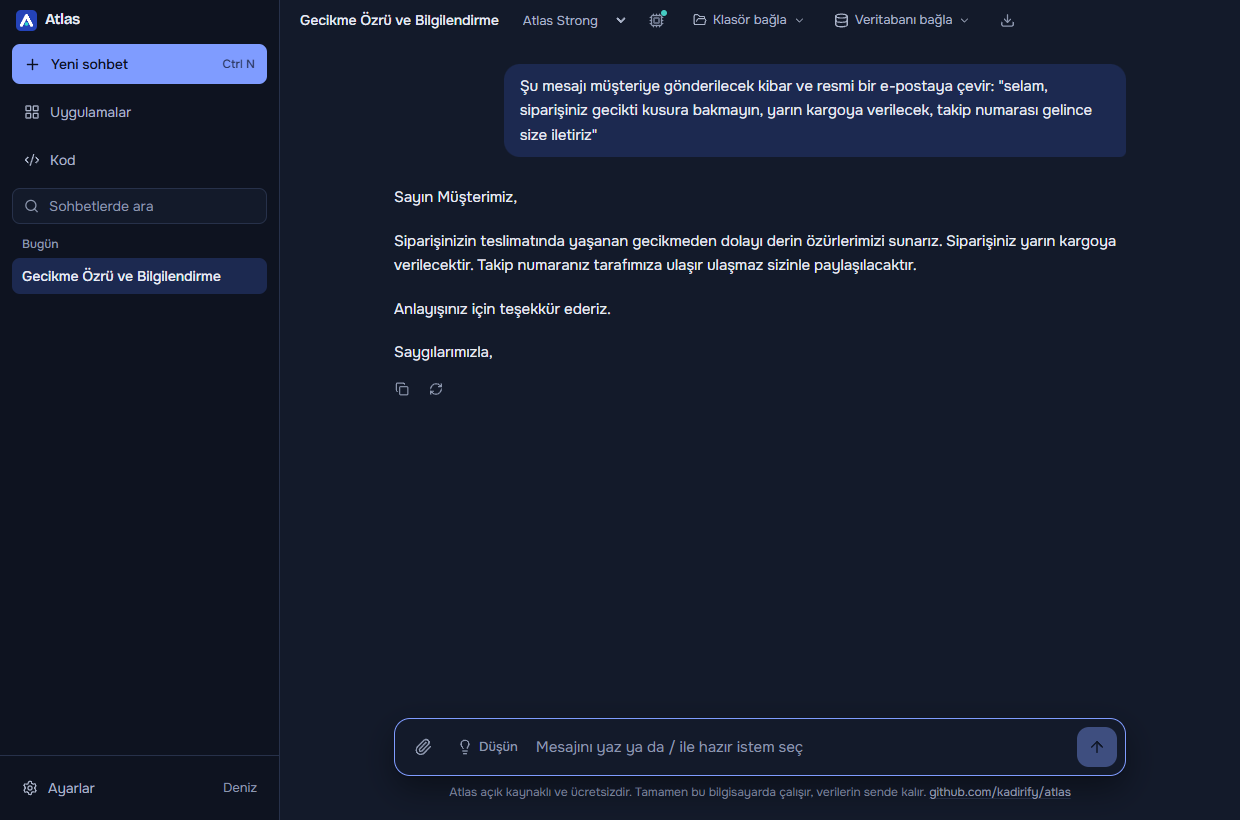
Cloud assistants are powerful, but you can't always send company data, a customer list or your source code to someone else's server. Atlas is built for that gap.
Questions, files and chats never leave your computer. No account, no subscription.
After setup it works on a plane, on site, or on an air-gapped network.
Atlas ships its own models, fine-tuned for Turkish and clearly better than their base models at proofreading. English works too.
The app is MIT-licensed, the models are Apache 2.0. Anyone can read the code.
Emails, reports, formal letters, meeting minutes. Answers stream live; Markdown, tables and code blocks render properly.
Open a project folder. Atlas reads files, writes a plan, shows each change line by line and waits for your approval, then runs your tests and checks the result.
Everything runs on your computer. Before changing anything, Atlas shows you and waits for your approval.
Emails, reports, summaries, translations, formal letters and Turkish proofreading.
Attach PDF, Word and Excel files; they open side by side in their own view.
Open a project; Atlas reads, plans, writes with your approval and runs tests.
ATLAS.mdSQL Server, PostgreSQL, MySQL/MariaDB and SQLite. Ask in plain language; Atlas writes the query.
One-click apps for meeting minutes, formal letters, email replies and more.
.atlasapp filesFix, translate or shorten selected text in any program with a shortcut.
Each one is an open base model fine-tuned for Turkish, trained on a single home PC with a 12 GB graphics card. The setup wizard picks the one that fits your hardware.
| Model | Base | Size | Spelling test: base → Atlas | Atlas-TR |
|---|---|---|---|---|
| Atlas LightMost laptops; everyday tasks | Qwen 3.5 4B | 3.5 GB | 90 → 92 | |
| Atlas Medium8 GB GPU; understands images | Gemma 4 E4B | 7.3 GB | 97 → 97 | |
| Atlas Strong12 GB+ GPU; long text, reasoning | Gemma 4 12B | 9.2 GB | 98 → 98 | |
| Atlas CodeCode, debugging, SQL | Qwen2.5-Coder 14B | 9.0 GB | 92 → 91 |
Spelling test: 300 rule-corrupted Turkish sentences never seen in training. Atlas-TR: a 92-question general Turkish benchmark across 10 categories (base → Atlas). The models are not trained from scratch; they are LoRA fine-tunes of open models. For PCs with 8 GB RAM and no GPU, Atlas Mini runs on its base model. Data, method and what did not work: How the Atlas models were trained
The models also work outside Atlas with Ollama, llama.cpp or LM Studio.
Chats, documents and settings live in a single file on your computer. No usage statistics, no crash reports, no advertising IDs.
Neither sends any information about you.
.env or key files. It stays inside the folder you connect.These rules are enforced by the app, not by instructions to the model. Details (Turkish)
Get the Atlas-Setup file from the releases page and run it.
On first launch the wizard checks your PC, installs Ollama and suggests the Atlas model that fits your hardware.
Once the model is downloaded, Atlas works without internet. Your chats stay on your computer.
The installer isn't code-signed, so Windows may show an "Unknown publisher" warning. Only download it from the official GitHub releases page.
Your chats, files and questions never go to any server. Atlas only goes online during setup, to download Ollama and the model, and to check GitHub for new versions. You can turn update checks off in Settings → About. Neither sends any information about you.
Those are much larger models running in the cloud, and they are stronger at complex tasks. Atlas is different because your data stays on your computer, it works offline and for free, it is fine-tuned for Turkish, and it works directly with your files and databases.
No. Atlas and its models are completely free and open source: the app is MIT, the models are Apache 2.0.
Yes, but slowly. On a PC with 8 GB RAM and no GPU, Atlas Mini is recommended; with 16 GB RAM, Atlas Light. The setup wizard picks a suitable model. Models run on Ollama, so AMD cards supported by Ollama work too; NVIDIA gives the best experience.
Windows only for now. The system tray, shortcuts and selected-text features were written for Windows; other systems are on the roadmap.
No. They are fine-tunes of open models such as Gemma 4 and Qwen, adapted for Turkish. The whole process is documented in How the Atlas models were trained.
Atlas has no delete tool and never runs known delete commands. It shows a diff and asks before changing files, and you can undo its changes with one button.
The one limit is commands: a command you approve (e.g. npm test) runs the files in your project. That's why Atlas takes a snapshot before each command; for important projects we still recommend version control such as git.
SELECT queries run without asking, every query that changes data shows an approval card, and delete queries never run. Your password is encrypted with Windows' secure store. For production databases, connect with a read-only user.
On GitHub Issues. Include the version number from Settings → About and how the bug happened. For security issues, see SECURITY.md.

Free, open source and offline. It's an early release, already usable for everyday work.